Have you ever ended an 8-hour workday feeling completely exhausted, yet realizing you barely made progress on your single most important project? You spent the entire day replying to email pings, answering Slack threads, and attending reactive status calls.
This productivity trap is known as context switching. Research by the University of California shows it takes an average of 23 minutes and 15 seconds to regain deep focus after a single interruption.
The time blocking method solves this by converting your calendar into a proactive blueprint for your day. Below is your complete guide to how time blocking works, its 4 most powerful variations, and practical templates to implement it immediately.
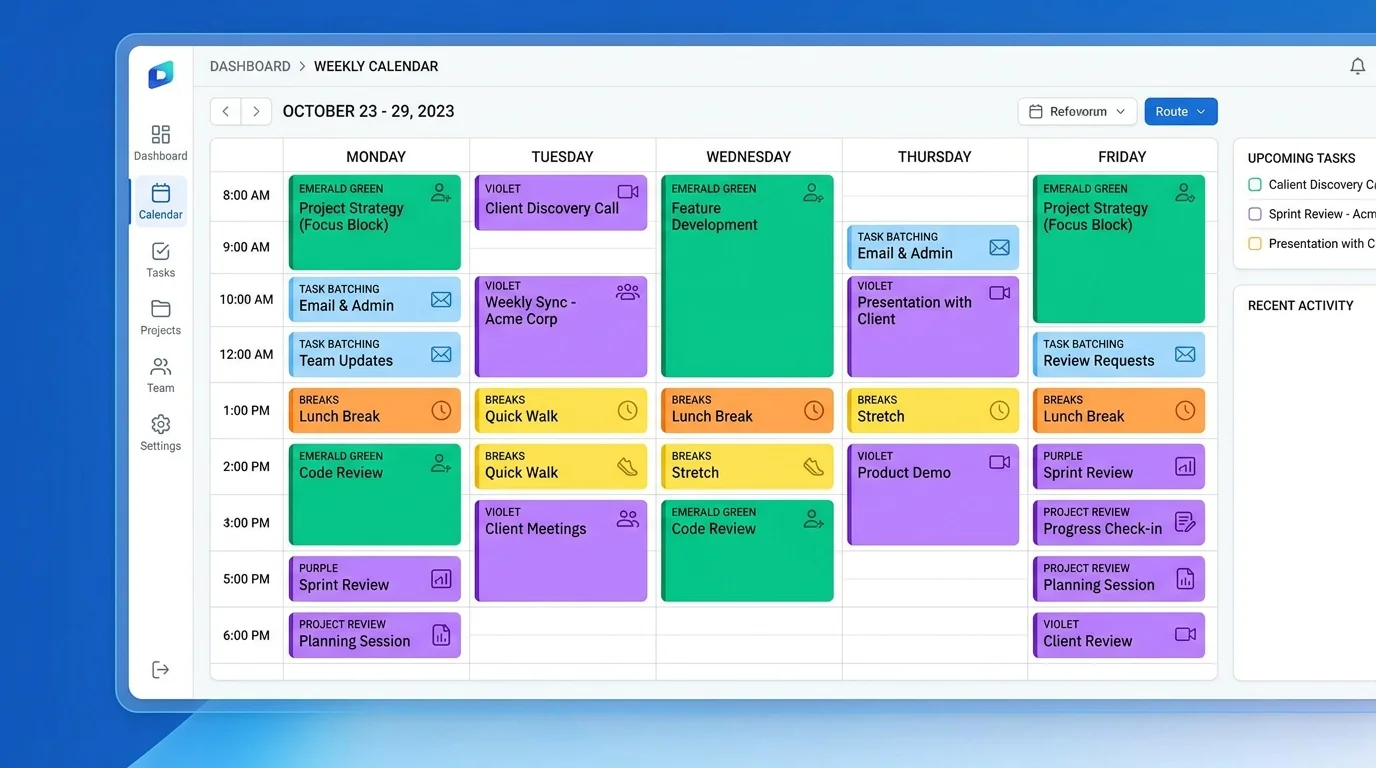
What is Time Blocking?
Time blocking is a time management technique where you divide your day into dedicated blocks of time, assigning each block exclusively to a specific task, project, or activity.
Instead of working from an open-ended to-do list where you decide what to do in real-time, time blocking forces you to decide when each priority will get done in advance. When a block starts, you focus solely on that assigned commitment until the block ends.
Why Traditional To-Do Lists Fail
Standard to-do lists treat all hours and tasks as equal. In reality, an open-ended list creates three psychological pitfalls that destroy productivity:
- Parkinson's Law: Work expands to fill the time allotted for its completion. Without clear boundaries, a 30-minute task easily stretches across half your workday.
- Decision Fatigue: When you finish one task, your brain must constantly evaluate 15 other items. By afternoon, your cognitive willpower is exhausted, leading to social media browsing and busywork.
- Urgent vs. Important Imbalance: Without reserved focus windows, urgent micro-tasks (like incoming emails and notifications) consistently crowd out high-value strategic work.
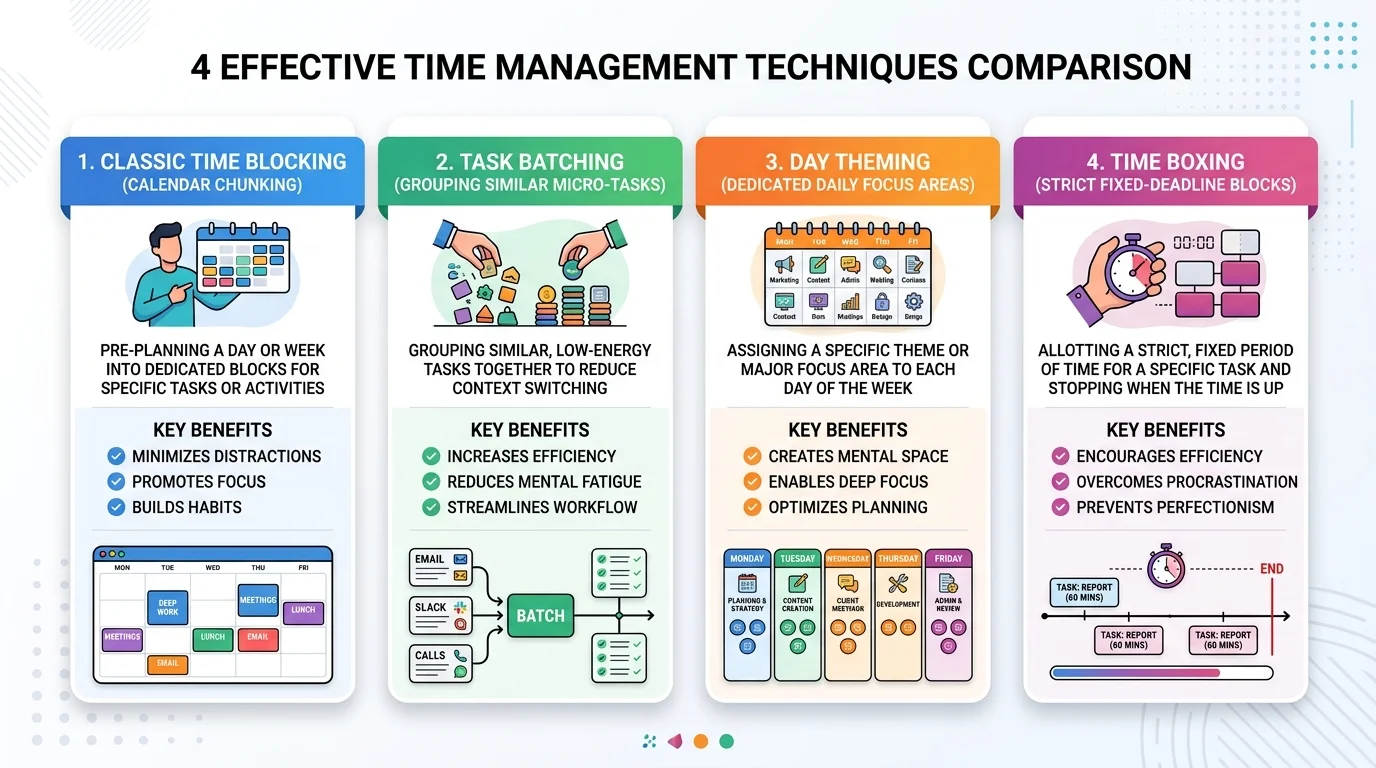
3 Types of Time Blocking (Plus Timeboxing)
If you're skeptical about time blocking, consider these variations to find the one that best matches your personality, role, and workflow:
1. Timeboxing
Think of timeboxing as time blocking's stricter cousin. With time blocking, you allocate a calendar window to work on a task. With timeboxing, you set a strict hard deadline(e.g., "I have exactly 45 minutes to draft this client proposal"). When the timer expires, you stop working regardless of completion. This is ideal for overcoming perfectionism.
2. Task Batching
Instead of checking Slack 40 times a day or answering emails as they trickle in, you group similar low-energy tasks into one or two dedicated 30-minute batch blocks (e.g., 11:30 AM and 4:30 PM). This saves hours of cognitive context-switching penalties.
3. Day Theming
You designate each day of the workweek for a specific business theme:
- Mondays: Internal planning, team standups & sprint roadmaps
- Tuesdays & Thursdays: Deep execution & uninterrupted development
- Wednesdays: Client discovery calls & external meetings
- Fridays: Code reviews, administrative wrap-up & retrospectives
Time Management Methods Compared
Here is a side-by-side comparison of the core methods:
| Method | Core Concept | Best Suited For | Primary Advantage | Recommended Duration |
|---|---|---|---|---|
| Classic Time Blocking | Divide calendar into focused time chunks for specific tasks | Knowledge workers, developers, writers & project managers | Eliminates decision fatigue & guards uninterrupted focus | 60 – 90 min blocks |
| Task Batching | Group similar repetitive micro-tasks into a single block | Answering emails, customer support tickets, invoicing & admin | Drastically reduces context switching cognitive penalties | 30 – 45 min blocks |
| Day Theming | Dedicate each entire day of the week to one core business theme | Founders, team leaders, executives & entrepreneurs | Enables long-term strategic execution without daily task chaos | Full working day (8 hrs) |
| Time Boxing | Set a strict fixed deadline clock; stop work when timer hits zero | Perfectionists, open-ended research & rapid prototype drafting | Forces speed, decisive action & overcomes Parkinson's Law | 25 – 60 min hard caps |
How to Time Block in 5 Steps
- Identify Top Priorities: Select your 2 to 3 highest-impact tasks for the upcoming day.
- Estimate Time with Buffers: Add a 25% buffer to your estimated durations to prevent schedule overflow.
- Schedule Deep Work During Peak Hours: Place complex focus tasks during your biological peak energy windows (usually morning).
- Build In Buffer Blocks: Leave at least 45 minutes of unallocated buffer time each afternoon to absorb unexpected requests.
- Review with Activity Tracking: Use software like Tracknesty to verify if your actual focus time matches your planned blocks.
Benefits of Time Blocking for Remote Teams
Setting 2 to 3 hours of mandatory overlapping collaboration windows protects the rest of the workday for asynchronous deep focus blocks where team members can snooze notifications guilt-free.
- Eliminate Time Theft & Blockers: With Tracknesty, remote team leads can verify active focus windows, monitor screenshot milestones, and catch artificial idle bypassers without micromanagement. TrackNesty's live screen monitoring software allows managers to view active employee screens in real time to spot operational bottlenecks and assist team members instantly.
- Accurate Client Billing: Link time blocks directly to client projects and tasks to ensure billable hours are tracked with 100% precision.
- Prevent Remote Burnout: Enforcing explicit time blocks for lunch breaks and end-of-day sign-offs prevents remote workers from overextending into the evening.
Frequently Asked Questions
What if an unexpected emergency interrupts my time block?
Treat your schedule as a living document. Shift the interrupted task into your afternoon buffer block or swap it with a lower-priority task later in the week.
Is time blocking suitable for creative work?
Yes. Time blocking is especially effective for writers, designers, and developers because it creates large, protected stretches of uninterrupted time necessary for entering a psychological "flow state."
What tools do I need to start time blocking?
You can start with Google Calendar, Outlook, or Notion. To verify that you and your team actually stick to your blocks, pair your calendar with Tracknesty for automated desktop activity and time tracking.